2010年1月20日水曜日

PS3のコントローラーを使う

今回はPS3のコントローラーをROSノードにする方法を勉強します。

http://www.ros.org/wiki/ps3joy

必要なもの
・PS3(PlayStation3)コントローラー
・BluetoothアダプタがささったPC

まず、ROSにはjoy_nodeというLinuxのジョイスティック入力を使うためのノードが用意されています。
ROSのps3joyパッケージがやるのは、PS3コントローラーを普通のLinuxジョイスティックとして使うためのラッパーみたいなものです。

ペアリング
http://www.ros.org/wiki/ps3joy/Tutorials/PairingJoystickAndBluetoothDongle

まずはパッケージをmakeします。

$ rosdep install ps3joy
$ rosmake ps3joy
 
次にUSBケーブルでPS3コントローラーをBluetoothを搭載したPCにつなぎます。
そして以下のようにコマンドを打ちます。
$ sudo bash
# rosrun ps3joy sixpair
これでPS3のコントローラーにPCのMACアドレスを教えています。

複数のUSBドングルがある場合は
# hciconfig
してMACアドレスを調べて、

$ rosrun ps3joy sixpair 00:22:B0:D0:5A:09
のようにするといいみたいです。

ひきつづきUSBケーブルを抜いてから、
# rosrun ps3joy ps3joy.py
すると
Waiting for connection. Disconnect your PS3 joystick from USB and press the pairing button.
と表示されるので、
PSボタンを押すと
Connection activated
と表示され接続されます。

Ubuntu8.10で接続できましたが、なぜか左スティックでマウスカーソルが動いてしまいます。
こうしたらちゃんと動きました。
 
では引き続きこれで亀でも動かして見ますか。
http://www.ros.org/wiki/ps3joy/Tutorials/WritingTeleopNode
ではいつものようにsandboxの中でパッケージを作って遊びましょう。
$ roscd sandbox
$ roscreate-pkg learning_ps3joy roscpp turtlesim ps3joy
では以下をsrc/teleop_turtle_ps3joy.cppとして保存してください。


#include <ros/ros.h>
#include <turtlesim/Velocity.h>
#include <joy/Joy.h>

class TeleopTurtle
{
public:
  TeleopTurtle();

private:
  void joyCallback(const joy::Joy::ConstPtr& joy);

  ros::NodeHandle nh_;

  int linear_, angular_;
  double l_scale_, a_scale_;
  ros::Publisher vel_pub_;
  ros::Subscriber joy_sub_;

};

TeleopTurtle::TeleopTurtle():
  linear_(1),
  angular_(2),
  l_scale_(50.0),
  a_scale_(2.0)
{

  nh_.param("axis_linear", linear_, linear_);
  nh_.param("axis_angular", angular_, angular_);
  nh_.param("scale_angular", a_scale_, a_scale_);
  nh_.param("scale_linear", l_scale_, l_scale_);


  vel_pub_ = nh_.advertise<turtlesim::Velocity>("turtle1/command_velocity", 1);
  joy_sub_ = nh_.subscribe<joy::Joy>("joy", 10, &TeleopTurtle::joyCallback, this);
}

void TeleopTurtle::joyCallback(const joy::Joy::ConstPtr& joy)
{
  turtlesim::Velocity vel;
  vel.angular = a_scale_*joy->axes[angular_];
  vel.linear = l_scale_*joy->axes[linear_];
  vel_pub_.publish(vel);
}

int main(int argc, char** argv)
{
  ros::init(argc, argv, "teleop_turtle");
  TeleopTurtle teleop_turtle;

  ros::spin();
}
これは
http://www.ros.org/wiki/joystick_drivers/Tutorials/TeleopNode
のサンプルとまったく同じコードです。
つまりPS3だけでなく普通のジョイスティックでも使えます。
 
コードは見れば分かりますね。
#Include<turtlesim/Velocity.h>
で亀を動かすためのメッセージ、
#include<joy/Joy.h>
でジョイスティックのメッセージ
を読み込めるようにしています。

今まであまりやっていないのが、

nh_.param("axis_linear", linear_, linear_);
  nh_.param("axis_angular", angular_, angular_);
  nh_.param("scale_angular", a_scale_, a_scale_);
  nh_.param("scale_linear", l_scale_, l_scale_);

の部分で、 パラメータを定義しています。
このパラメータで、亀の速度とジョイスティックの入力数値との比率を変えられます。 
初期値と変更したい変数を入れています。
ではいつものようにCMakeLists.txtを以下を追加してビルドします。
rosbuild_add_executable(turtle_teleop_ps3joy src/turtle_teleop_ps3joy.cpp)
 
実行前にジョイスティックをユーザーが触れるようにパーミッションをあげちゃいましょう。
$ sudo chmod a+rw /dev/input/js0
 
先に述べたように、上にコピペしたプログラムは普通のジョイスティック用です。
パラメータを調整する必要があるので、以下のようなlaunchファイルを作って、
パラメータを設定して実行しましょう。
 
ソースを変えちゃえばすむんですが、
コンパイル無しでプログラムを変更できるところがROSの柔軟性ですから、
このように実行時にパラメータ調整したほうがいいでしょう。
Don't Repeat Yourselfの原則もありますしね。 


<launch>

 <!-- Turtlesim Node-->
  <node pkg="turtlesim" type="turtlesim_node" name="sim"/>


 <!-- PS3 joy node -->
  <node respawn="true" pkg="ps3joy"
        type="ps3_joy_node" name="PS3_turtle_joy" >
    <param name="dev" type="string" value="/dev/input/js0" />
    <param name="deadzone" value="0.12" />
  </node>

 <!-- Axes -->
  <param name="axis_linear" value="1" type="int"/>
  <param name="axis_angular" value="0" type="int"/>
  <param name="scale_linear" value="2" type="double"/>
  <param name="scale_angular" value="2" type="double"/>

  <node pkg="learning_ps3joy" type="turtle_teleop_ps3joy" name="teleop"/>

</launch>
 
1つのターミナルで
$ sudo bash
# rosrun ps3joy ps3joy.py

とした後に
$ roslaunch learning_ps3joy turtle_ps3joy.launch
 として実行します。
今回は少しうまくかけたかな。
もちろんOTLとPS3のコントローラーで書いてみましたよ。
 
これで、おしゃれなロボットへの入力装置ができました!

2010年1月18日月曜日

ROS Coding Ruleその2

以前ROSのコーディングルールはGoogleのものっぽい。
と書きましたが。

この記事を書いたときはサンプル等のコードから推測したのですが、
ちゃんと書いてありました。


http://www.ros.org/wiki/CppStyleGuide

やっぱりGoogleのものがベースみたいです。

それ以前に以下のデベロッパーズガイドを読むのが先でしたね。
http://www.ros.org/wiki/DevelopersGuide

GUIはwxWidgetsを使うなどの指示もあります。


ドキュメントの大本は、これですね。
品質確保のためのプロセス全体の記述があります。
http://www.ros.org/wiki/QAProcess
コードレビューの仕方、テストのやり方、ドキュメントの残し方などの指示があります。

こちらは単体テスト。
http://www.ros.org/wiki/UnitTesting

自分のリポジトリを作って公開するならこのへんは熟読が必要ですね。

2010年1月17日日曜日

ROS JP Wave

Google WaveにROSのWaveができたみたいなんで、
興味のある方は覗いてみてください。

https://wave.google.com/wave/?#restored:wave:googlewave.com!w%252BFK23iN6cA

waveのアカウントない方はInviteしますのでお気楽にご連絡を。

ros-jpメーリングリストも作りたいですね。

追記:ありました。知りませんでした。
こういう情報が簡単に共有されていくといいですね。
https://lists.sourceforge.net/lists/listinfo/ros-users-ja

2010年1月15日金曜日

USBカメラを使ってOpenCVを試す

アームが動かせるようになったので、今度はカメラで認識させた結果を使ってロボットを動かしたくなります。


シミュレータ上でもカメラを使えるみたいです。
http://www.ros.org/wiki/pr2_simulator/Tutorials/UsingStereoProcessingInSimulation

でもちょっとこのPCでは非力なので、ちょっと不安定でした。

そこで、せっかくなので本物のカメラでためしてみます。

USBカメラ使えないのかな?と思ってwikiを調べたらありました。

http://www.ros.org/wiki/usb_cam

boschさんのリポジトリです。こういう外部のライブラリがすぐ見つかるのもいいですね。

http://bosch-ros-pkg.svn.sourceforge.net/
ここからDLしました。

$ rosdep install usb_cam
$ rosmake usb_cam
してみます。

エラーがでますね。
manifest.xmlが十分じゃないのかな?

エラーメッセージは以下です。
/home/ogutti/ros/pkgs/bosch_drivers/usb_cam/src/libusb_cam/usb_cam.cpp:292: error: ‘avcodec_alloc_frame’ was not declared in this scope

そこで、
$ apt-get install libavcodec-dev
してみました。

さらに、パスがよろしくない(Ubuntu8.10)みたいなので
sudo ln -s /usr/include/ffmpeg /usr/include/libavcodec
sudo ln -s /usr/include/ffmpeg /usr/include/libswscale
しました。
これでビルドできるはず。
(ソースの方いじってもいいかもです。)

さらに、
bosch_drivers/usb_cam/src/usb_cam_node/usb_cam_node.cpp
のオプションをいじります。

ちなみに私の環境(Mac Book Pro/ Ubuntu 8.10 内臓iSight利用)では
pixel_formatをyuyvにしたら動きました。

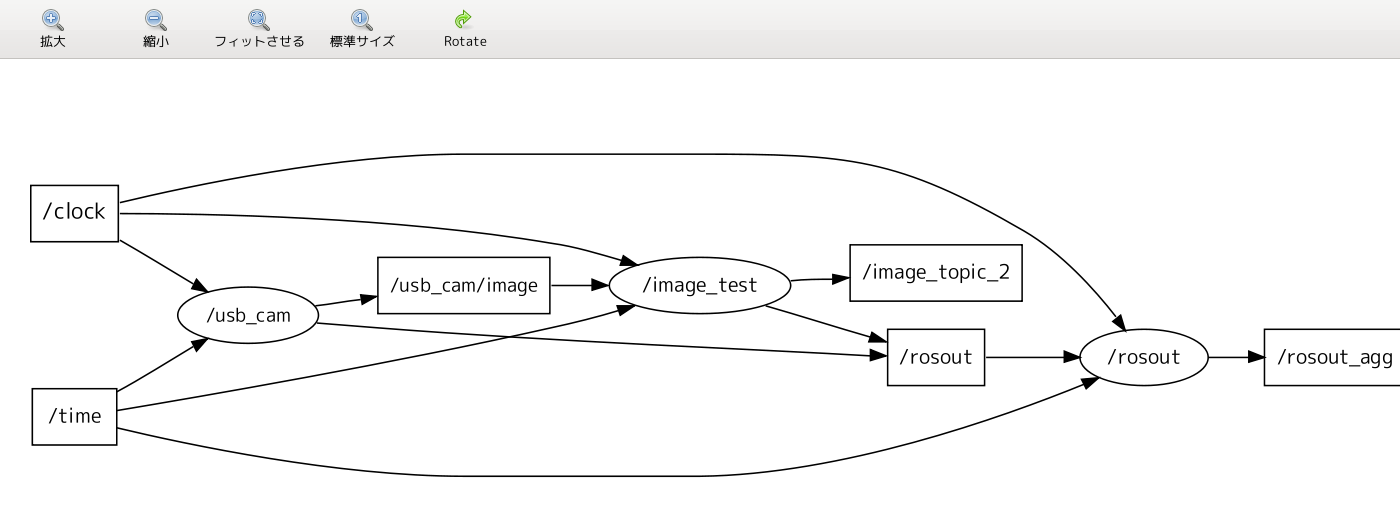
usb_camノードが/usb_cam/imageにsensor_msgs/Image型のトピックを発行します。


そこで以下にあるサンプルを使って表示してみます。
img_test.cppという名前にしました。

$ img_test image_topic:=/usb_cam/image
としました。(image_topicという名前のトピックを/usb_cam/imageにリマップしています。)


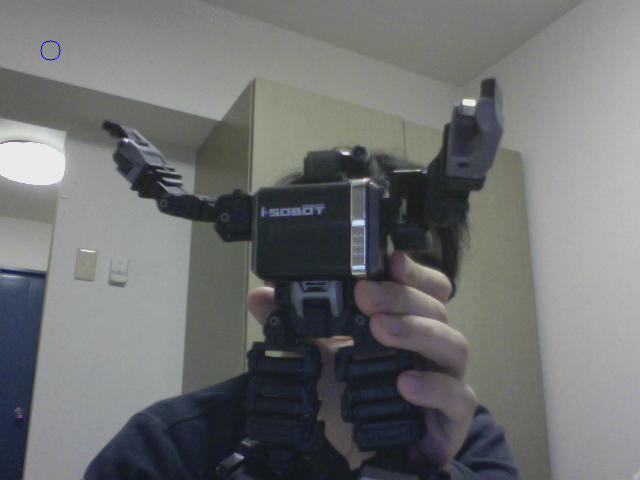
おー、表示されています。
これは結構感動ですね。

iSight -> /dev/video0 -> usb_cam_node -> (/usb_cam/image) -> img_test


という流れです。

これでカメラを使ってロボットを動かすことができそうですね。

2010年1月13日水曜日

インタラクティブにIKに指令するクライアントを作る

前回IKのサービスを使うクライアントを作りました。
今回はもう少しインタラクティブに操作できるものを作ります。

以前使ったturtle_teleopのクライアントと、前回作ったPythonスクリプトを参考に、
カーソルキーを押すと、押した方向に手先位置を動かすクライアントを試しに作ってみました(動作保証しません)。


#include <ros/ros.h>
#include <signal.h>
#include <termios.h>
#include <stdio.h>
#include <kinematics_msgs/IKQuery.h>
#include <kinematics_msgs/IKService.h>
#include <kinematics_msgs/FKService.h>
#include <ik_trajectory_tutorial/ExecuteCartesianIKTrajectory.h>
#include <vector>

#define KEYCODE_R (0x43)
#define KEYCODE_L (0x44)
#define KEYCODE_U (0x41)
#define KEYCODE_D (0x42)
#define KEYCODE_Q (0x71)

#define KEYCODE_P (0x70)
#define KEYCODE_N (0x6e)

#define INIT_POS_X ( 0.55)
#define INIT_POS_Y (-0.19)
#define INIT_POS_Z ( 0.70)
#define INIT_ORI_X ( 0.02)
#define INIT_ORI_Y (-0.09)
#define INIT_ORI_Z ( 0.0)
#define INIT_ORI_W ( 1.0)

#define DLENGTH (0.04)

class TeleopPr2
{
public:
  TeleopPr2();
  void keyLoop();
  void call_ik();
private:
  ros::NodeHandle nh_;
  double dx_, dy_, dz_;
  geometry_msgs::Pose pose_;
  ros::ServiceClient ik_client_;
};

#define IK_SERVICE_NAME "execute_cartesian_ik_trajectory"

TeleopPr2::TeleopPr2():
  nh_(),
  pose_(),
  ik_client_(nh_.serviceClient<ik_trajectory_tutorial::executecartesianiktrajectory>(IK_SERVICE_NAME))
{
  dx_=dy_=dz_=0;

  pose_.position.x = INIT_POS_X;
  pose_.position.y = INIT_POS_Y;
  pose_.position.z = INIT_POS_Z;

  pose_.orientation.x = INIT_ORI_X;
  pose_.orientation.y = INIT_ORI_Y;
  pose_.orientation.z = INIT_ORI_Z;
  pose_.orientation.w = INIT_ORI_W;


  ROS_INFO("Waiting for services to be ready");
  ros::service::waitForService(IK_SERVICE_NAME);
  
  ROS_INFO("Services ready");
}

int kfd = 0;
struct termios cooked, raw;

void quit(int sig)
{
  tcsetattr(kfd, TCSANOW, &cooked);
  ros::shutdown();
  exit(0);
}


int main(int argc, char** argv)
{
  ros::init(argc, argv, "teleop_pr2");
  TeleopPr2 teleop_pr2;

  signal(SIGINT,quit);

  teleop_pr2.keyLoop();
  
  return(0);
}


void TeleopPr2::call_ik()
{
  ik_trajectory_tutorial::ExecuteCartesianIKTrajectory ik_req;
  ik_req.request.header = roslib::Header();
  ik_req.request.header.frame_id = "base_link";
  ik_req.request.header.stamp = ros::Time::now();

  //ik_req.poses = std::vector<geometry_msgs::pose>;
  ik_req.request.poses.resize(0);
  ik_req.request.poses.push_back(pose_);
  ROS_INFO("Calling IK service");
  printf("q%f %f %f, %f %f %f %f\n",
  pose_.position.x,
  pose_.position.y,
  pose_.position.z,
  pose_.orientation.x,
  pose_.orientation.y,
  pose_.orientation.z,
  pose_.orientation.w);
  ik_client_.call(ik_req);

  if (ik_req.response.success)
  {
    ROS_INFO("success!");
  }
  else
  {
    ROS_ERROR("fail!");
    //back to last pose
    pose_.position.x -= dx_;
    pose_.position.y -= dy_;
    pose_.position.z -= dz_;

  }
}

void TeleopPr2::keyLoop()
{
  char c;
  bool dirty=false;


  // get the console in raw mode                                                              
  tcgetattr(kfd, &cooked);
  memcpy(&raw, &cooked, sizeof(struct termios));
  raw.c_lflag &=~ (ICANON | ECHO);
  // Setting a new line, then end of file                         
  raw.c_cc[VEOL] = 1;
  raw.c_cc[VEOF] = 2;
  tcsetattr(kfd, TCSANOW, &raw);

  puts("Reading from keyboard");
  puts("---------------------------");
  puts("Use arrow keys to move the right arm.");


  for(;;)
  {
    // get the next event from the keyboard  
    if(read(kfd, &c, 1) < 0)
    {
      perror("read():");
      exit(-1);
    }

    dx_=dy_=dz_=0;

    printf("code=%x\n", c);

    switch(c)
    {
      case KEYCODE_L:
        ROS_DEBUG("LEFT");
        dy_ += DLENGTH;
        dirty = true;
        break;
      case KEYCODE_R:
        ROS_DEBUG("RIGHT");
        dy_ -= DLENGTH;
        dirty = true;
        break;
      case KEYCODE_U:
        ROS_DEBUG("UP");
        dx_ += DLENGTH;
        dirty = true;
        break;
      case KEYCODE_D:
        ROS_DEBUG("DOWN");
        dx_ -= DLENGTH;
        dirty = true;
        break;
      case KEYCODE_P:
        ROS_DEBUG("P");
        dz_ += DLENGTH;
        dirty = true;
        break;
      case KEYCODE_N:
        ROS_DEBUG("N");
        dz_ -= DLENGTH;
        dirty = true;
        break;
    }
   
    if(dirty ==true)
    {
      pose_.position.x += dx_;
      pose_.position.y += dy_;
      pose_.position.z += dz_;

      call_ik();
      dirty=false;
    }
  }

  return;
}


静止画だとちょっと説明しずらいですが、
インタラクティブにロボットを操作できるものができました。

僕はロボットの上位系を作るのが好きなので、
だんだん楽しくなってきました。

反応速度にかなり問題がありますが、シミュレータが遅いからなのか、計算が悪いのか、
ちょっと分かりません。
手先の場所によっては、ちょっと動かすだけで手首がぐるぐるしちゃったりしていて、
まだIKの安定感がないですね。

ソースは以下に置きましたので、そっちをDLしてみても結構です。
http://code.google.com/p/otl-ros-pkg/

PR2のアームを逆運動学を使って動かす

今回はPR2のアームを、前回やった逆運動学を使って動かします。

http://www.ros.org/wiki/pr2/Tutorials/Moving%20the%20arm%20through%20a%20Cartesian%20pose%20trajectory

じゃあ、まず
$ roslaunch pr2_gazebo pr2_empty_world.launch
して、

$ rosrun pr2_controller_manager pr2_controller_manager list
で、コントローラーが動いているのを確かめましょう。

r_arm_controller (running)
ならOKです。

今回作るサンプルは、XYZ空間の座標列を貰い、それを手先で追従するようなサービスを作ります。

ではまずパッケージ作成。
$ roscreate-pkg ik_trajectory_tutorial actionlib roscpp joint_trajectory_action geometry_msgs manipulation_srvs pr2_arm_ik kinematics_msgs joint_states_listener pr2_controllers_msgs tf
うわー、めっちゃ依存多いですね。まあ、大体みたことあるものですね。
manipulation_srvsだけないかな?

まずはサービスの型(メッセージ)を決めます。
ヘッダと空間座標のposesを受け取り、成否を返すメッセージです。
以下をsrv/ExecuteCartesianIKTrajectory.srvとして保存しましょう。
Header header
geometry_msgs/Pose[] poses
---
uint32 success

CMakeLists.txtのrosbuild_gensrvをコメントインして、
rosmakeしておきましょう。

では以下をsrc/ik_trajectory_tutorial.cppとして保存です。

#include <stdio.h>
#include <stdlib.h>
#include <time.h>
#include <ros/ros.h>
#include <pr2_controllers_msgs/JointTrajectoryAction.h>
#include <actionlib/client/simple_action_client.h>
#include <kinematics_msgs/IKQuery.h>
#include <kinematics_msgs/IKService.h>
#include <kinematics_msgs/FKService.h>
#include <joint_states_listener/ReturnJointStates.h>
#include <ik_trajectory_tutorial/ExecuteCartesianIKTrajectory.h>
#include <vector>
#define MAX_JOINT_VEL 0.5 //in radians/sec static const std::string ARM_IK_NAME = "/pr2_ik_right_arm/ik_service"; typedef actionlib::SimpleActionClient<pr2_controllers_msgs:: JointTrajectoryAction> TrajClient; class IKTrajectoryExecutor{ private: ros::NodeHandle node; ros::ServiceClient ik_client; ros::ServiceClient joint_states_client; ros::ServiceServer service; pr2_controllers_msgs::JointTrajectoryGoal goal; kinematics_msgs::IKService::Request ik_request; kinematics_msgs::IKService::Response ik_response; TrajClient *action_client; public: IKTrajectoryExecutor(){ //create a client function for the IK service ik_client = node.serviceClient<kinematics_msgs::IKService> (ARM_IK_NAME, true); //tell the joint trajectory action client that we want //to spin a thread by default action_client = new TrajClient("r_arm_controller/joint_trajectory_action", true); //wait for the action server to come up while(!action_client->waitForServer(ros::Duration(5.0))){ ROS_INFO("Waiting for the joint_trajectory_action action server to come up"); } //use the return_joint_states service to get the current joint angles joint_states_client = node.serviceClient <joint_states_listener::ReturnJointStates>("return_joint_states"); //wait for the return_joint_states service to be ready ROS_INFO("Waiting for return_joint_states service to be ready\n"); ros::service::waitForService("return_joint_states"); //register a service to input desired Cartesian trajectories service = node.advertiseService("execute_cartesian_ik_trajectory", &IKTrajectoryExecutor::execute_cartesian_ik_trajectory, this); //have to specify the order of the joints we're sending in our //joint trajectory goal, even if they're already on the param server goal.trajectory.joint_names.push_back("r_shoulder_pan_joint"); goal.trajectory.joint_names.push_back("r_shoulder_lift_joint"); goal.trajectory.joint_names.push_back("r_upper_arm_roll_joint"); goal.trajectory.joint_names.push_back("r_elbow_flex_joint"); goal.trajectory.joint_names.push_back("r_forearm_roll_joint"); goal.trajectory.joint_names.push_back("r_wrist_flex_joint"); goal.trajectory.joint_names.push_back("r_wrist_roll_joint"); } ~IKTrajectoryExecutor(){ delete action_client; } //run inverse kinematics on a PoseStamped (7-dof pose //(position + quaternion orientation) + header specifying the //frame of the pose) //tries to stay close to double positions[7] //returns the solution angles in double solution[7] bool run_ik(geometry_msgs::PoseStamped pose, double positions[7], double solution[7]){ kinematics_msgs::IKService::Request ik_request; kinematics_msgs::IKService::Response ik_response; ik_request.data.joint_names.push_back("r_shoulder_pan_joint"); ik_request.data.joint_names.push_back("r_shoulder_lift_joint"); ik_request.data.joint_names.push_back("r_upper_arm_roll_joint"); ik_request.data.joint_names.push_back("r_elbow_flex_joint"); ik_request.data.joint_names.push_back("r_forearm_roll_joint"); ik_request.data.joint_names.push_back("r_wrist_flex_joint"); ik_request.data.joint_names.push_back("r_wrist_roll_joint"); ik_request.data.link_name = "r_wrist_roll_link"; ik_request.data.pose_stamped = pose; ik_request.data.positions.resize(7); for(int i=0; i<7; i++) ik_request.data.positions[i] = positions[i]; bool ik_service_call = ik_client.call(ik_request,ik_response); if(!ik_service_call){ ROS_ERROR("IK service call failed!"); return 0; } for(int i=0; i<7; i++){ solution[i] = ik_response.solution[i]; } ROS_INFO("solution angles: %0.3f %0.3f %0.3f %0.3f %0.3f %0.3f %0.3f", solution[0],solution[1], solution[2],solution[3], solution[4],solution[5],solution[6]); ROS_INFO("IK service call succeeded"); return 1; } //figure out where the arm is now bool get_current_joint_angles(double current_angles[7]){ int i; joint_states_listener::ReturnJointStates joint_states_srv; joint_states_srv.request.name.push_back("r_shoulder_pan_joint"); joint_states_srv.request.name.push_back("r_shoulder_lift_joint"); joint_states_srv.request.name.push_back("r_upper_arm_roll_joint"); joint_states_srv.request.name.push_back("r_elbow_flex_joint"); joint_states_srv.request.name.push_back("r_forearm_roll_joint"); joint_states_srv.request.name.push_back("r_wrist_flex_joint"); joint_states_srv.request.name.push_back("r_wrist_roll_joint"); if(joint_states_client.call(joint_states_srv)){ for(i=0; i<7; i++) current_angles[i] = joint_states_srv.response.position[i]; return 1; } else{ ROS_ERROR("Failed to call service joint_states_srv"); return 0; } } //send a desired joint trajectory to the joint trajectory executor //and wait for it to finish bool execute_joint_trajectory(std::vector<double *> joint_trajectory){ int i, j; int trajectorylength = joint_trajectory.size(); //get the current joint angles double current_angles[7]; get_current_joint_angles(current_angles); //fill the goal message with the desired joint trajectory goal.trajectory.points.resize(trajectorylength+1); //set the first trajectory point to the current position goal.trajectory.points[0].positions.resize(7); goal.trajectory.points[0].velocities.resize(7); for(j=0; j<7; j++){ goal.trajectory.points[0].positions[j] = current_angles[j]; goal.trajectory.points[0].velocities[j] = 0.0; } //make the first trajectory point start 0.5 seconds from when we run goal.trajectory.points[0].time_from_start = ros::Duration(0.5); //fill in the rest of the trajectory double time_from_start = 0.; for(i=0; i<trajectorylength; i++){ printf("goal point %d: ", i); goal.trajectory.points[i+1].positions.resize(7); goal.trajectory.points[i+1].velocities.resize(7); //fill in the joint positions (velocities of 0 mean that the arm //will try to stop briefly at each waypoint) for(j=0; j<7; j++){ printf("%0.3f ", joint_trajectory[i][j]); goal.trajectory.points[i+1].positions[j] = joint_trajectory[i][j]; goal.trajectory.points[i+1].velocities[j] = 0.0; } printf("\n"); //compute a desired time for this trajectory point using a max //joint velocity double max_joint_move = 0; for(j=0; j<7; j++){ double joint_move = fabs(goal.trajectory.points[i+1].positions[j] - goal.trajectory.points[i].positions[j]); if(joint_move > max_joint_move) max_joint_move = joint_move; } double seconds = max_joint_move/MAX_JOINT_VEL; ROS_INFO("max_joint_move: %0.3f, seconds: %0.3f", max_joint_move, seconds); time_from_start += seconds; goal.trajectory.points[i+1].time_from_start = ros::Duration(time_from_start); printf("\n"); } //when to start the trajectory goal.trajectory.header.stamp = ros::Time::now() + ros::Duration(0.5); ROS_INFO("Sending goal to joint_trajectory_action"); action_client->sendGoal(goal); action_client->waitForResult(); //get the current joint angles for debugging get_current_joint_angles(current_angles); ROS_INFO("joint angles after trajectory: %0.3f %0.3f %0.3f %0.3f %0.3f %0.3f %0.3f\n", current_angles[0],current_angles[1], current_angles[2],current_angles[3],current_angles[4],current_angles[5],current_angles[6]); if(action_client->getState() == actionlib::SimpleClientGoalState::SUCCEEDED){ ROS_INFO("Hooray, the arm finished the trajectory!"); return 1; } ROS_INFO("The arm failed to execute the trajectory."); return 0; } //service function for execute_cartesian_ik_trajectory bool execute_cartesian_ik_trajectory( ik_trajectory_tutorial::ExecuteCartesianIKTrajectory::Request &req, ik_trajectory_tutorial::ExecuteCartesianIKTrajectory::Response &res){ int trajectory_length = req.poses.size(); int i, j; //IK takes in Cartesian poses stamped with the frame they belong to geometry_msgs::PoseStamped stamped_pose; stamped_pose.header = req.header; stamped_pose.header.stamp = ros::Time::now(); bool success; std::vector<double *> joint_trajectory; //get the current joint angles (to find ik solutions close to) double last_angles[7]; get_current_joint_angles(last_angles); //find IK solutions for each point along the trajectory //and stick them into joint_trajectory for(i=0; i<trajectory_length; i++){ stamped_pose.pose = req.poses[i]; double *trajectory_point = new double[7]; success = run_ik(stamped_pose, last_angles, trajectory_point); joint_trajectory.push_back(trajectory_point); if(!success){ ROS_ERROR("IK solution not found for trajectory point number %d!\n", i); return 0; } for(j=0; j<7; j++) last_angles[j] = trajectory_point[j]; } //run the resulting joint trajectory ROS_INFO("executing joint trajectory"); success = execute_joint_trajectory(joint_trajectory); res.success = success; return success; } }; int main(int argc, char** argv){ //init ROS node ros::init(argc, argv, "cartesian_ik_trajectory_executor"); //sleep(1); IKTrajectoryExecutor ik_traj_exec = IKTrajectoryExecutor(); ROS_INFO("Waiting for cartesian trajectories to execute"); ros::spin(); return 0; }


かなり長いです。
でも大体がこれまでやったことと同じですので分かると思います。

実行するためのクライアントが以下です。
#test client for ik_trajectory_tutorial

import roslib
roslib.load_manifest('ik_trajectory_tutorial')
import rospy
from ik_trajectory_tutorial.srv import ExecuteCartesianIKTrajectory
from geometry_msgs.msg import Pose
import time
import sys
import pdb
import tf

#execute a Cartesian trajectory defined by a root frame, a list of 
#positions (x,y,z), and a list of orientations (quaternions: x,y,z,w)
def call_execute_cartesian_ik_trajectory(frame, positions, orientations):
    rospy.wait_for_service("execute_cartesian_ik_trajectory")

    #fill in the header (don't need seq)
    header = roslib.msg.Header()
    header.frame_id = frame
    header.stamp = rospy.get_rostime()

    #fill in the poses
    poses = []
    for (position, orientation) in zip(positions, orientations):
        pose = Pose()
        pose.position.x = position[0]
        pose.position.y = position[1]
        pose.position.z = position[2]
        pose.orientation.x = orientation[0]
        pose.orientation.y = orientation[1]
        pose.orientation.z = orientation[2]
        pose.orientation.w = orientation[3]
        poses.append(pose)

    #call the service to execute the trajectory
    print "calling execute_cartesian_ik_trajectory"
    try:
        s = rospy.ServiceProxy("execute_cartesian_ik_trajectory", \
                                   ExecuteCartesianIKTrajectory)
        resp = s(header, poses)
    except rospy.ServiceException, e:
        print "error when calling execute_cartesian_ik_trajectory: %s"%e
        return 0
    return resp.success

#pretty-print list to string
def pplist(list):
    return ' '.join(['%2.3f'%x for x in list])

#print out the positions, velocities, and efforts of the right arm joints
if __name__ == "__main__":
    rospy.init_node("test_cartesian_ik_trajectory_executer")
    tf_listener = tf.TransformListener()
    time.sleep(.5) #give the transform listener time to get some frames

    joint_names = ["r_shoulder_pan_joint",
                   "r_shoulder_lift_joint",
                   "r_upper_arm_roll_joint",
                   "r_elbow_flex_joint",
                   "r_forearm_roll_joint",
                   "r_wrist_flex_joint",
                   "r_wrist_roll_joint"]

    positions = [[.76, -.19, .83], [0.59, -0.36, 0.93]]
    orientations = [[.02, -.09, 0.0, 1.0], [0.65, -0.21, .38, .62]]

    success = call_execute_cartesian_ik_trajectory("base_link", \
            positions, orientations)

    #check the final pose
    (trans, rot) = tf_listener.lookupTransform('base_link', 'r_wrist_roll_link', rospy.Time(0))
    print "end Cartesian pose: trans", pplist(trans), "rot", pplist(rot)

    if success:
        print "trajectory succeeded!"
    else:
        print "trajectory failed."
なぜかjoint_namesいれてるけど、意味ないですね。


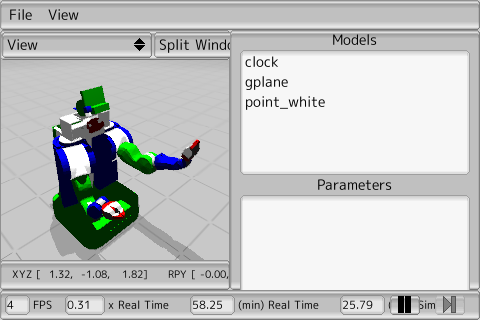
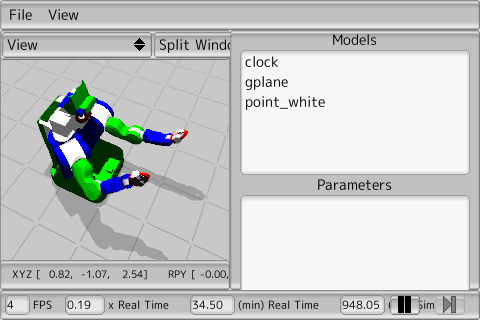
動かしてみると、こんな感じ。


グラフィカルに手先をぐいぐい引っ張るインタフェース欲しいですね。
今回はサンプル長いのでいったん切ります。